Digital Transformation Starts with Documents: Turning Document Data into Usable Business Information
A mid-sized manufacturer spent eight months and a seven-figure budget rolling out a new ERP, and leadership called the smooth go-live a milestone in their digital transformation journey. Three weeks later, the accounts payable team was still opening scanned invoices, reading totals by eye, and typing them into the new system by hand. The software has changed. The information feeding it had not. This is a more common story than most transformation roadmaps admit, because a large share of operational content still lives inside PDFs, scans, and email attachments that no system can read on its own. The real value of digital transformation is often decided earlier than people expect. Right now, a document first enters the business.
What Digital Transformation Actually Means
Digital transformation is not a single purchase. It is not simply moving to the cloud, launching an ERP, or adding an AI assistant to an existing process, since all of that can happen without much actually changing how work gets done. Real transformation changes how information, processes, systems, and people interact with each other. A handful of elements decide how far a program reaches, including systems, data, documents, workflows, people, and decisions. Most budgets focus almost entirely on systems and treat documents as an afterthought, which is exactly why so many programs stall before delivering the value of leadership expected.
Why Digital Transformation Stalls at the Document Layer
Here is the pattern inside many transformed companies. The core software is new, but the daily reality underneath it has barely moved. Invoices still arrive as PDF attachments; contracts get signed and emailed around for review, and field teams fill out paper forms that sit untouched for days.
Important business information still enters through several common channels, including:
PDFs and scanned documents
Email attachments and forms
Invoices, contracts, and purchase orders
KYC documents and onboarding paperwork
Being one of many digital documents does not mean the information inside is usable. A scanned invoice is technically a digital document, but if someone still has to open it, read the total, and type that figure into an ERP by hand, nothing has really been transformed. The hidden cost adds quietly through manual data entry, rework from misread figures, delays chasing the final version, version confusion, and processes that simply do not scale with volume. If documents are where the friction starts, the fix has to begin at the point they enter the process.
Document Capture: Where the Transformation Really Begins
This is why document capture software deserves more strategic attention than it usually gets. Capture is often dismissed as just scanning, but that undersells what it needs to be accomplished. Content enters a business from several directions, including email, scanners, mobile photos from a field technician, and old repositories nobody has cleaned up.
Good document capture software does more than collect files. It brings them into a process in a form the downstream system can actually use; a step Regoxa's document input capability is built specifically for, regardless of whether content arrives by email, scan, fax, or upload. Capturing a file only means having a copy of something, while capturing usable information means a system can read it, sort it, and act on it without a person retyping the contents. Once a document has been captured, the next question is simple. Can a machine read it?
OCR Technology: Turning Documents into Machine-Readable Text
That is the job of OCR technology. It converts text from scanned images and PDFs into machine-readable text a computer can process. Without it, a scanned invoice is just a picture of numbers sitting in a folder. With it, that page becomes text a system can index, search, and pull data from.
OCR technology matters most for a few recurring document types:
Scanned PDFs received from vendors
Documents photographed in the field
Printed forms and structured tables
Handwritten notes, where supported
The quality of OCR at this stage decides the accuracy of everything downstream, since a misread digit in an invoice totals flow straight into the payment system and eventually becomes a reconciliation headache. Regoxa's OCR and ICR engine is built to read both printed and handwritten text across varied and dynamic layouts, and for document-heavy processing at scale, Regoxa Parser handles that extraction directly. Even so, OCR only reads the characters. Reading a document is not the same as understanding it, and that gap is exactly what comes next.
From OCR to Intelligent Document Processing
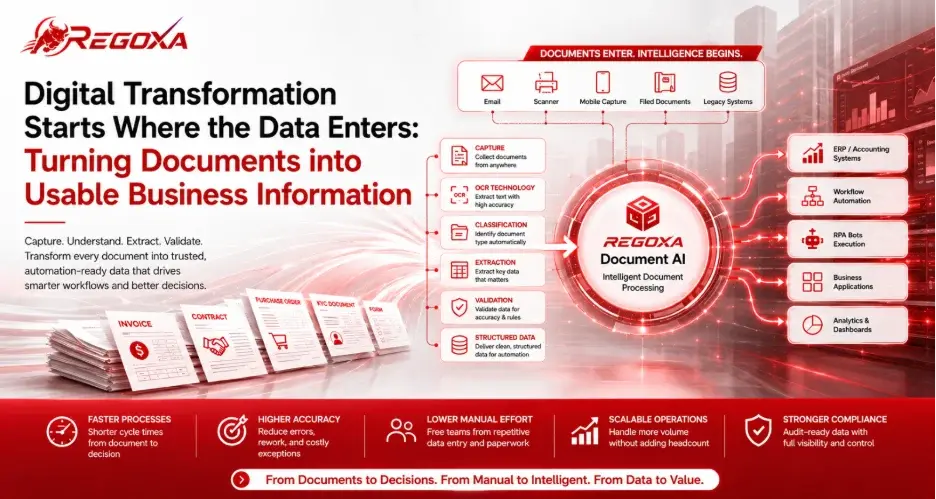
Intelligent document processing closes the gap OCR leaves open. OCR reads characters, while intelligent document processing classifies the document, extracts the fields that matter, and validates that what it found makes sense. The typical flow moves through capture, OCR, classification, extraction, validation, and finally structured data. For an invoice, that means pulling the vendor's name, invoice number, date, purchase order number, tax, and total. For a KYC document, it means identifying customer details, document type, and identification information. Regoxa Document AI sits at this layer, and its classification and splitting step sorts incoming documents automatically before its extraction and validation step pulls and checks the fields that matter, turning a readable page into something a workflow can use.
Structured Data: The Bridge to Automation
Extracted information only becomes valuable once it is converted into structured data that business applications can consume, often delivered as JSON, CSV, or another format the receiving system understands. An ERP, CRM, or workflow engine cannot reliably act on a document just because a human can read it. It needs structured, validated fields it can plug directly into a process. Once information reaches this structured state, it is finally ready to move into the part of the business that does something about it.
How Document Workflow Automation Turns Data into Business Action
This is where document workflow automation ties the entire chain together, connecting document, capture, OCR, intelligent document processing, structured data, workflow, and business action into one continuous flow.
A few examples make this concrete:
An invoice becomes extracted data that triggers approval and flows into the ERP for payment
A KYC document becomes structured customer information that feeds an onboarding workflow
A claim form becomes extracted claim data that enters a claims process
A purchase order becomes structured procurement information ready for matching and approval
Where automation needs to trigger the next step without a manual handoff, Regoxa's robotic process automation connects extracted data to the systems that act on it. Getting a document into structured shape is only part of the picture, since teams also need to work with these documents together through review, approval, and version tracking. This is where document collaboration tools and enterprise document management matter, keeping a well-structured document from getting lost the moment colleagues start emailing different versions back and forth. Cloud document management extends this further through Regoxa Cloud, the platform every Regoxa product runs on from capture through to output, making sure the same structure and access controls hold whether documents live on premises, in the cloud, or across a hybrid setup.
Where Businesses Can Apply Document-Driven Automation
Finance and accounts payable: invoices become extracted data that flows into approval and ERP payment workflows without manual retyping, an area Regoxa's accounts payable automation is built around
Procurement: purchase orders and supplier documents become structured procurement information ready for matching and approval
Banking and KYC: identity and application documents become verified customer information feeding customer onboarding workflows
Insurance: claims forms and supporting documents become extracted claim data that routes directly into the claim's workflow, an area covered under Regoxa's insurance automation
Logistics: delivery documents become structured shipment information, and at a volume, manual handling cannot match, which is where Regoxa's transportation and logistics solution applies
Legal and contracts: contracts become extracted, structured information that moves through review and approval without losing track of the current version, supported by Regoxa's legal document automation
How Regoxa Supports the Document Intelligence Layer
It is worth being specific about where Regoxa fits, rather than treating it as one generic tool. Across the chain of document capture, OCR, intelligent document processing, structured data, and workflow, Regoxa sits at the OCR and document intelligence portion, not the entire downstream architecture.
Regoxa Parser handles OCR and document parsing, converting scanned files and PDFs into machine-readable text. Regoxa Document AI builds on that with classification, extraction, and validation, turning raw content into structured, workflow-ready data. For everyday PDF handling, including editing, PDF to Word conversion, and version comparison, Regoxa PDF Editor covers that layer directly, which matters since most document-heavy teams touch PDF editing tools daily rather than only during a large transformation initiative. For high-volume batches that need archiving and fast retrieval, Regoxa Mercury turns stacks of paper into searchable archives. Where extracted data needs to trigger the next step automatically, Regoxa's RPA integration connects that structured output to downstream systems, and flexible APIs and SDKs let all of this plug into an existing ERP or CRM without ripping anything out.
Regoxa does not replace the ERP, the CRM, or the workflow engine sitting downstream. It is the layer that makes sure those systems receive information they can act on; instead of a scanned page, someone still must interpret it by hand.
The Transformation Was Never Just the Software
Go back to the manufacturer from the opening. The ERP was live, the dashboards worked, and accounts payable was still typing numbers off a scanned page. That gap was never a software failure. It was a gap in the information feeding the software. Document capture brings content in, OCR technology makes it readable, intelligent document processing gives it structure, structured data makes it usable, and document workflow automation connects that data to the decisions a business needs to make. That is the full journey behind any digital transformation program that touches documents, and it is usually the quietest, most overlooked part of the roadmap. The software was never the whole transformation. The information running through it always was, and fixing that layer is often the fastest way to get more value out of the digital transformation investment a company already made.
Key Takeaways
Digital transformation changes how information, systems, and people work together, not just what software a company buys
Most transformation programs stall at the document layer rather than the software layer
Document capture software is where usable information begins, not just where files get collected
OCR technology makes documents readable, while intelligent document processing adds the classification and structure OCR cannot provide alone
Structured data lets business systems act on document content without manual re-entry
Document workflow automation connects structured data to real business outcomes
Regoxa's products map to specific parts of this chain, including OCR, extraction, PDF handling, and automation, rather than one generic tool
Frequently Asked Questions
What is digital transformation?
Digital transformation is the process of changing how an organization's systems, data, documents, and workflows work together to support better decisions and outcomes. It goes beyond buying new software or moving to the cloud, since the real shift happens when information flows cleanly between people, processes, and platforms.
Why does digital transformation stall in the document layer?
Most transformation budgets go toward visible systems like ERPs and cloud platforms, while the documents feeding those systems get treated as an afterthought. Invoices, contracts, and forms keep arriving as scans or attachments that require manual entry, so the software changes, but the information process underneath does not.
What is document capture software?
Document capture software brings content into a business process from wherever it originates, including email, scanners, mobile devices, and uploaded files. Its job is to bring documents in usable, not just to collect files.
What is OCR technology?
OCR technology converts text from scanned documents and images into machine readable text a computer can process. It is the foundation everything else depends on, since without it a scanned page is just an image no system can search or extract data from.
What is intelligent document processing?
Intelligent document processing builds OCR by classifying documents, extracting the fields that matter, and validating that the data makes sense before handing it off. It is the difference between reading a document and actually understanding it.
What is structured data?
Structured data is extracted from document information converted into a format such as JSON or CSV that business applications can consume directly, without a person interpreting the content first.
What is document workflow automation?
Document workflow automation connects structured document data to the systems and actions that need it, such as triggering an ERP payment, starting an onboarding process, or routing an insurance claim.
What are digital documents?
Digital documents are files like PDFs and scans that exist in digital form, but being digital does not automatically make the information inside usable, since a scanned invoice still needs OCR and extraction before a system can act on it.
What is enterprise document management?
Enterprise document management governs how documents are stored, versioned, accessed, and audited across an organization, keeping teams aligned on a single current version instead of scattered copies.
How does Regoxa support digital transformation?
Regoxa provides the document intelligence layer many transformation programs are missing, combining OCR, intelligent document processing, and PDF editing tools that turn unstructured content into structured data ready to connect to ERPs, CRMs, and automated workflows through APIs and RPA integration.
Comments